|
Gantt Chart
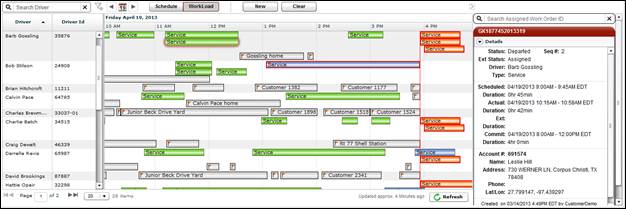
The Gantt chart shows the drivers in a selected group or your entire fleet and their assigned work orders for the current day. The Gantt chart only displays drivers who have work orders assigned. FleetOutlook defines an active driver as a driver who has driven more than one mile.
Work orders are displayed as bars on the Gantt chart. The length of each bar is dependent on schedule duration. The bar color indicates the job status. The bar colors change as the job status changes.
Rest your mouse over any bar and a Work Order Tool Tip displays basic information about the work order.
Select any bar on the Gantt chart and the Work Order screen is displayed to the left. Click the Collapse/Expand button above the Work Order screen to collapse or expand the Work Order screen.