


 |
Add Service Record
The Add Service Record allows you to establish a baseline for a scheduled service. The Vehicle Maintenance Module uses the date and odometer provided to start the maintenance interval tracking for vehicles assigned to a scheduled service. If you do not establish a baseline, the Date Due column displays “No History Available.”
To Add an Initial Service Record:
1. Select the Vehicle Name from the drop-down list.
2. Select a Vehicle Category to limit the vehicles display in the Vehicle Name drop-down list.
• The assigned service items for the vehicle display in the Service Schedule list.
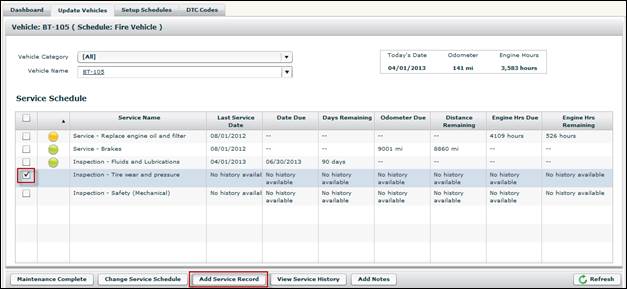
3. Select the check box for service item to which you want to assign a baseline service record.
4. Click the Add Service Record button.
• The Setup Last Service Record screen displays.
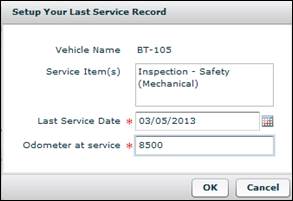
5. Populate the Last Service Date and Odometer at Service fields.
• Both the Last Service Date and the Odometer at Service fields are required.
6. Click the OK button.
• The Vehicle Maintenance Module displays the last service date and automatically increments the odometer, calendar or engine hour intervals to reflect when the maintenance is next due.